How to generate a DVLA check code
Create a DVLA check code on GOV.UK or in the Driver Codes app, then share the code and the last 8 characters of your licence number. The code lasts 21 days and can be used once.
A DVLA check code is created by you, not by the hire desk. On GOV.UK View or share your driving licence information you enter your driving licence number, National Insurance number and the postcode on your licence, then create a code. In Driver Codes you open Check codes and generate one in a few taps.
Give the requester two things: the code, and the last 8 characters of your driving licence number. They redeem both at Check someone's driving licence information. The code lasts 21 days and works once. If you only needed the definition, start with what a DVLA check code is.
What you need before you start
| Item | Why it is required | If you do not have it |
|---|---|---|
| Driving licence number | GOV.UK and the app identify your record with it | Read section 5 on the photocard, or a previous letter from DVLA |
| National Insurance number | Proves it is you, not someone with a similar name | Use the HMRC find-your-NI-number service, or a payslip or P60 |
| Postcode on the licence | Must match the address DVLA currently holds | If you have moved, update your licence address first |
| Last 8 characters of the licence number | The checker cannot redeem the code without them | Count from the right-hand end of the number on the photocard |
You do not need the plastic card in your hand if you already know those details. You do need a Great Britain licence. Northern Ireland licences use the DVA / nidirect service, not this GOV.UK path.
Creating a code is free on GOV.UK and free for drivers in Driver Codes.
How do I generate a DVLA check code on GOV.UK?
- Open View or share your driving licence information.
- Enter your driving licence number, National Insurance number and the postcode on your licence.
- Open Share your licence information.
- Create a new check code.
- Copy the code. Keep the last 8 characters of your licence number next to it.
GOV.UK also lets you create a code through your driver and vehicles account. If the website will not accept your details, DVLA's contact centre for this service is 0300 083 0013 (Monday to Friday, 8am to 7pm; Saturday, 8am to 2pm). Confirm those hours on the GOV.UK page before you call, because they change.
The official checker page is a different URL. Do not send a hire desk to the view-your-own-licence page. Send them to check someone's driving licence information.
How do I generate a check code in Driver Codes?
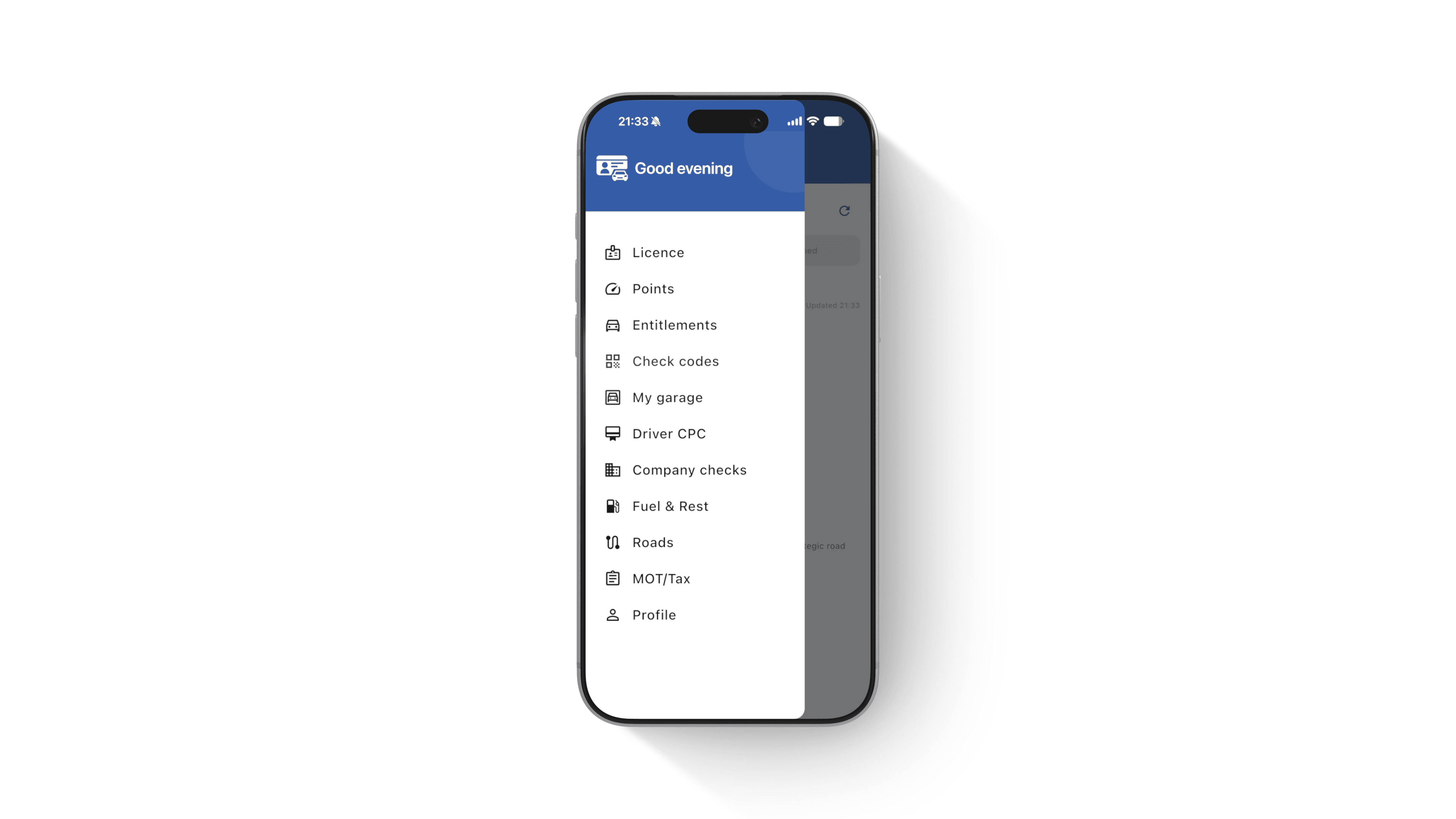
- Open the Driver Codes app and sign in with the account linked to your licence.
- Tap the menu icon at the top left.
- Open Check codes.
- Use any unused code already on that screen, or generate a new one with the button at the bottom.
- Share it as a link (email, WhatsApp, Messenger), show it full screen at a desk, or let the requester scan the QR code.
Unused codes stay on that screen until they expire or someone redeems them. A spent code will not work at the next desk. There is a 43-second walkthrough at how to generate a check code.
The app does not replace GOV.UK. It stores the same DVLA check codes so you are not digging out a National Insurance number in a rental queue.
What do I give the person checking my licence?
Hand over exactly this pair:
- The check code you just created
- The last 8 characters of your driving licence number
They enter both on GOV.UK Check someone's driving licence information. GOV.UK is explicit: the code must be used within 21 days, and only once. After a successful view, generate a new code for the next organisation.
If you are the checker, you should also have the driver's permission. Accessing someone else's record without it is a criminal offence.
There is still a postal fallback. You and the driver complete form D888/1 and send a £5 cheque or postal order to Drivers Fee Paying Enquiries (DFPE) Team, DVLA, Swansea, SA99 1AJ. That path is slower than a code and exists for people who cannot use the website.
Why was my check code rejected?
Work through these in order. They account for almost every desk-side failure.
The code is older than 21 days. Generate a new one. Do not argue with the 21-day clock.
The code was already used. Insurers, agencies and a previous hire desk all count. Driver Codes will still list a code that has been shared. If someone has redeemed it, it is dead.
The last 8 characters are wrong. People copy the first 8, or drop a letter. Read from the right-hand end of the licence number.
The licence is Northern Irish. The GOV.UK service is for England, Wales and Scotland. Use the DVA check-code service instead.
The postcode on GOV.UK is an old address. DVLA will not issue a code against a postcode that is no longer on the record. Update the address, then try again.
A website charged you for a "DVLA code". That was not GOV.UK. Generate a free code on the official service or in the app and ignore the paid PDF.
When should I stop generating codes?
If a hire desk wants one proof this afternoon, generate a code. If an employer wants a new code every time they run a compliance cycle, you are in the wrong workflow.
For regular workplace checks, the driver authorises once in the app. The company then runs app-linked checks at £1 each, or £1.60 if the check has to go via DVLA Access to Driver Data (ADD). No driver fees. No lock-in. That sits on Driver Codes for business. You can still mint a normal check code in the app when a rental desk asks.
Do not use a check code to inspect your own points. Open check my driving licence or GOV.UK view. Sharing a code with yourself wastes the one use.
Not for you
This guide is a poor fit if you need someone else's record and they have not given you a code. Stop. Ask them to generate one.
It is also the wrong page if you want the meaning of 01, 78 or 96 on the back of the card. Those are restriction codes, not check codes.